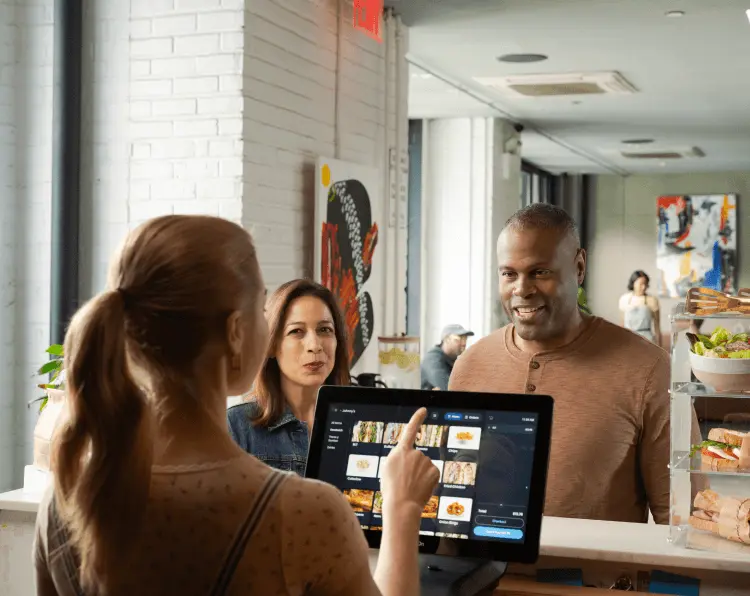
Food Ordering POS System: The Ultimate Guide for Restaurants and Cafés
A food ordering POS system is transforming how restaurants, cafés, fast-food outlets, and cloud kitchens operate. From taking orders and processing payments to managing inventory and customer data, modern POS systems streamline every aspect of food business management.
In today’s competitive food industry, adopting a reliable food ordering POS system is no longer optional — it is essential for improving efficiency, enhancing customer experience, and increasing profits.
This guide explores everything you need to know about food ordering POS systems, their benefits, features, and why your restaurant needs one.
What is a Food Ordering POS System?
A food ordering POS system (Point of Sale system) is a digital solution that allows restaurants and food businesses to manage orders, billing, payments, inventory, and customer data from a single platform.
Unlike traditional cash registers, modern POS systems integrate:
Order management
Payment processing
Inventory tracking
Kitchen display systems (KDS)
Customer management
Sales reporting and analytics
Whether you run a restaurant, café, takeaway, or food truck, a food ordering POS system helps automate daily operations and improve service delivery.
Why Every Restaurant Needs a Food Ordering POS System
1. Faster and Accurate Order Processing
Manual order taking can lead to errors and delays. A digital POS system ensures that orders are entered accurately and sent directly to the kitchen.
Benefits include:
Reduced order mistakes
Faster service
Improved customer satisfaction
Better coordination between staff and kitchen
This is especially important during peak hours when speed and accuracy matter most.
2. Streamlined Billing and Payments
A modern food ordering POS system supports multiple payment methods, including:
Cash
Credit/debit cards
Mobile money (M-Pesa, Airtel Money)
Online payments
QR payments
This flexibility makes it easier for customers to pay and improves checkout speed.
Key Features of a Food Ordering POS System
When choosing a food ordering POS system, look for these essential features:
1. Order Management
The system should allow staff to:
Take dine-in, takeaway, and delivery orders
Customize menu items
Add special instructions
Send orders directly to the kitchen
This ensures smooth communication between front-of-house and kitchen staff.
2. Menu Management
A good POS system allows easy menu updates such as:
Adding new dishes
Changing prices
Creating combos and offers
Managing seasonal menus
Menu changes can be updated instantly across all ordering channels.
3. Inventory Tracking
Inventory management helps track:
Ingredients and stock levels
Usage and wastage
Supplier orders
Low-stock alerts
This prevents shortages and reduces food waste, saving money for your business.
4. Sales Reporting and Analytics
A food ordering POS system provides detailed reports on:
Daily sales
Best-selling items
Peak hours
Staff performance
Profit margins
These insights help business owners make informed decisions and improve profitability.
5. Kitchen Display System (KDS)
Instead of paper tickets, orders appear on a kitchen screen, helping chefs:
Prepare orders faster
Reduce confusion
Track order status
Improve kitchen efficiency
This enhances workflow and reduces delays.
6. Online Ordering Integration
Many modern POS systems integrate with:
Food delivery apps
Restaurant websites
Mobile ordering platforms
This allows customers to order online while the system automatically updates orders and inventory.
Benefits of Using a Food Ordering POS System
Improved Customer Experience
Customers expect fast and accurate service. A POS system ensures:
Quick order processing
Shorter waiting times
Accurate billing
Multiple payment options
Happy customers are more likely to return and recommend your restaurant.
Increased Efficiency
Automation reduces manual tasks such as:
Writing orders
Calculating bills
Tracking inventory
Preparing reports
Staff can focus more on customer service instead of paperwork.
Better Business Control
With real-time data and reports, restaurant owners can:
Monitor sales remotely
Track performance
Identify trends
Manage multiple branches
This level of control helps businesses grow faster.
Reduced Errors and Losses
Manual operations often lead to:
Billing errors
Lost orders
Inventory mismanagement
Revenue leakage
A food ordering POS system minimizes these risks and improves accuracy.
Who Should Use a Food Ordering POS System?
A food ordering POS system is ideal for:
Restaurants
Cafés
Fast food outlets
Coffee shops
Bakeries
Food trucks
Cloud kitchens
Bars and lounges
Whether you run a small café or a large restaurant chain, a POS system helps streamline operations and improve efficiency.
How to Choose the Best Food Ordering POS System
When selecting a POS system for your food business, consider:
Ease of Use
The system should be simple for staff to learn and use without extensive training.
Cloud-Based Access
Cloud POS systems allow you to manage your restaurant from anywhere using a phone, tablet, or computer.
Customization
Choose a system that allows menu customization, branding, and flexible features to suit your business.
Integration
Ensure the POS integrates with:
Payment systems
Delivery apps
Accounting software
Inventory tools
Customer Support
Reliable support ensures quick resolution of technical issues and minimal downtime.
Future of Food Ordering POS Systems
Technology continues to evolve, and food ordering POS systems are becoming smarter with features such as:
AI-powered sales insights
Self-order kiosks
Mobile ordering apps
Contactless payments
Customer loyalty programs
Automated marketing tools
These innovations help restaurants stay competitive and meet changing customer expectations.
Conclusion
A food ordering POS system is an essential tool for modern restaurants and food businesses. It simplifies order processing, improves accuracy, enhances customer experience, and provides valuable business insights.
By investing in the right POS system, restaurant owners can streamline operations, reduce costs, and increase profits. Whether you run a small café or a large restaurant, adopting a reliable food ordering POS system will help you stay ahead in the competitive food industry.
If you want to improve efficiency, boost sales, and deliver excellent service, now is the perfect time to implement a smart food ordering POS system in your business.
Top Trends in Food Ordering POS Systems
As the food industry evolves, modern POS systems are incorporating innovative features to meet new demands. Keeping up with trends ensures your business stays competitive. Some of the key trends include:
1. Mobile POS Solutions
Mobile POS devices allow servers and delivery staff to take orders anywhere in the restaurant or on the go. Benefits include:
Faster table service
Reduced wait times
Better customer engagement
2. Contactless and Digital Payments
With growing demand for convenience and hygiene, POS systems now support:
Mobile wallets
QR code payments
Tap-to-pay cards
Online prepayments
This improves payment speed and safety while appealing to tech-savvy customers.
3. AI and Analytics Integration
Advanced POS systems provide predictive analytics to help restaurants:
Forecast demand
Optimize staffing
Reduce waste
Design targeted promotions
AI insights can transform data into actionable strategies for growth.
4. Cloud-Based Systems
Cloud-based POS systems store data online, offering:
Remote access to sales and reports
Easy software updates
Multi-location management
Scalability for business expansion
This flexibility is crucial for restaurant chains and growing businesses.
5. Loyalty Programs and Customer Engagement
POS systems now integrate loyalty programs, allowing restaurants to:
Reward repeat customers
Track purchase history
Send personalized promotions
Increase customer retention
Loyalty features turn first-time visitors into loyal patrons, boosting long-term revenue.
Benefits of Integrating Online Ordering with Your POS System
With online food ordering becoming the norm, a POS system that integrates seamlessly with delivery platforms is essential. Here’s why:
Real-Time Order Updates
Online orders automatically appear in the POS system, reducing errors and improving kitchen efficiency.Centralized Management
Manage dine-in, takeaway, and delivery orders in one system.Inventory Synchronization
Stock levels update automatically when orders are placed online, preventing overselling or shortages.Customer Data Collection
Collect valuable insights such as preferences, order frequency, and feedback for better marketing campaigns.Revenue Growth
Online ordering expands your reach and increases sales without adding extra staff.
How a Food Ordering POS System Improves Restaurant Profitability
Implementing a modern POS system impacts your bottom line in several ways:
Reduced Labor Costs: Automation minimizes manual work and improves staff productivity.
Minimized Waste: Inventory tracking prevents overstocking and food spoilage.
Upselling Opportunities: POS systems can suggest add-ons or combo deals during checkout.
Faster Table Turnover: Efficient order processing allows more customers to be served.
Accurate Reporting: Helps identify high-margin items and optimize pricing strategies.
By leveraging these capabilities, restaurants can increase efficiency and maximize profits without compromising quality.
Key Takeaways
A food ordering POS system streamlines operations, reduces errors, and improves customer satisfaction.
Essential features include order management, payment processing, inventory tracking, reporting, and online ordering integration.
Modern trends like mobile POS, AI analytics, cloud-based systems, and loyalty programs are shaping the future of food service.
Restaurants using a POS system experience faster service, lower costs, and better business insights, ultimately driving higher profitability.
Adopting the right food ordering POS system is an investment in efficiency, customer experience, and business growth. Whether you operate a small café or a multi-branch restaurant, the right POS system can make your operations smoother, faster, and more profitable.