 Vega
Vega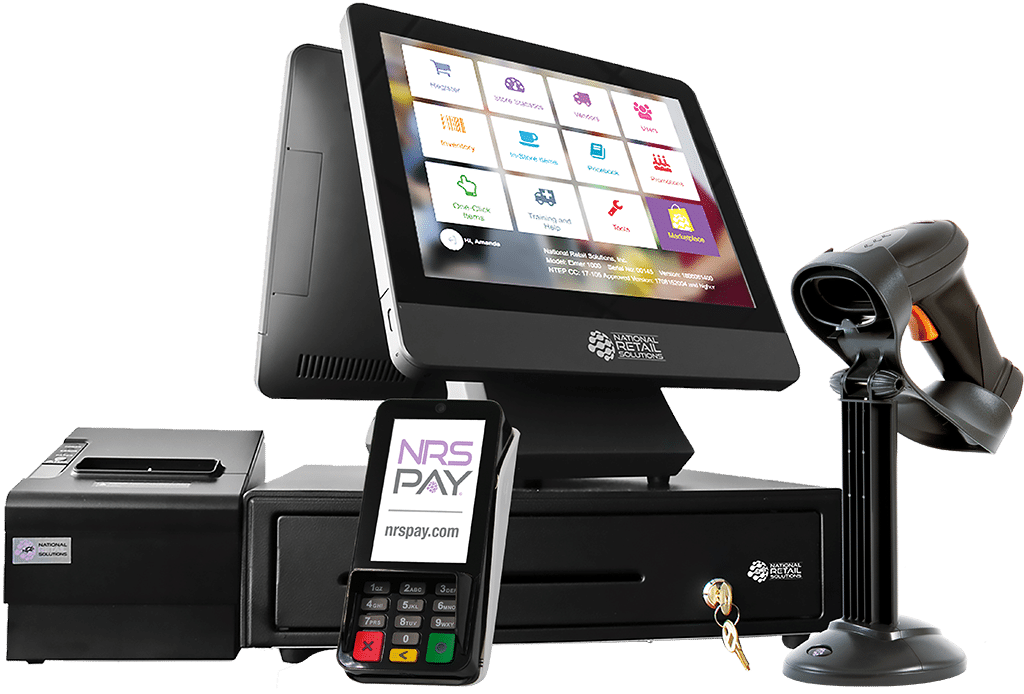
POS Machine: The Complete Guide to Choosing the Best Point of Sale System for Your Business
A POS machine (Point of Sale machine) is an essential business tool that helps companies process sales, manage inventory, track revenue, and improve customer experience. From small retail shops to restaurants, supermarkets, pharmacies, and service businesses, a POS machine streamlines daily operations and boosts efficiency.
In this guide, you’ll learn what a POS machine is, how it works, its benefits, types, features, pricing, and how to choose the best POS machine for your business.
What Is a POS Machine?
A POS machine is a combination of hardware and software that allows businesses to complete sales transactions. It records purchases, calculates totals, accepts payments, prints receipts, and stores sales data.
Modern POS machines do more than just billing—they act as full business management systems.
How a POS Machine Works
A POS machine follows a simple process:
Product Selection – Items are scanned or selected from the POS system
Price Calculation – Taxes, discounts, and totals are calculated
Payment Processing – Customer pays via cash, card, mobile money, or QR code
Receipt Generation – Printed or digital receipt is issued
Data Storage – Sales and inventory data are updated automatically
Benefits of Using a POS Machine
1. Faster Transactions
A POS machine reduces checkout time, improving customer satisfaction.
2. Accurate Sales Tracking
Every transaction is recorded, reducing errors and fraud.
3. Inventory Management
Automatically updates stock levels and alerts when items run low.
4. Multiple Payment Options
Supports cash, debit cards, credit cards, mobile money, and contactless payments.
5. Business Insights & Reports
Generate daily, weekly, or monthly sales reports for better decision-making.
Types of POS Machines
1. Traditional POS Machine
Desktop-based systems commonly used in supermarkets and retail stores.
2. Mobile POS Machine
Portable POS devices ideal for delivery services, food trucks, and outdoor sales.
3. Cloud-Based POS Machine
Stores data online, allowing access from anywhere and automatic updates.
4. All-in-One POS Machine
Combines screen, printer, and payment terminal into a single device.
Key Features of a Modern POS Machine
Touchscreen interface
Barcode scanner integration
Receipt printer support
Inventory and stock control
Employee management
Sales and tax reporting
Customer management (CRM)
Multi-store support
Offline mode for uninterrupted sales
POS Machine for Different Businesses
POS Machine for Retail Shops
Ideal for clothing stores, electronics shops, and mini-markets.
POS Machine for Restaurants
Includes table management, kitchen order tickets, and menu customization.
POS Machine for Supermarkets
Supports barcode scanning, bulk inventory, and fast checkout lanes.
POS Machine for Small Businesses
Affordable, easy to use, and scalable as the business grows.
POS Machine Price: What to Expect
The cost of a POS machine depends on features and hardware:
Basic POS Machine – Affordable, suitable for small shops
Mid-Range POS System – Includes inventory and reporting
Advanced POS Machine – Full business management and integrations
Prices may vary depending on:
Hardware type
Software features
Payment gateway integration
Support and maintenance
How to Choose the Best POS Machine
When selecting a POS machine, consider:
Type of business
Transaction volume
Supported payment methods
Ease of use
Local support and training
Scalability for future growth
POS Machine vs Cash Register
| Feature | POS Machine | Cash Register |
|---|---|---|
| Sales Reports | ✅ Yes | ❌ No |
| Inventory Tracking | ✅ Yes | ❌ No |
| Digital Payments | ✅ Yes | Limited |
| Business Insights | ✅ Advanced | ❌ None |
A POS machine offers far more value and control than a traditional cash register.
Why Invest in a POS Machine Today?
A POS machine helps businesses:
Increase efficiency
Reduce operational errors
Improve customer experience
Gain real-time business insights
Grow faster with data-driven decisions
In today’s competitive market, a POS machine is no longer optional—it’s essential.
Frequently Asked Questions (FAQs)
What is the best POS machine for small businesses?
A cloud-based POS machine with inventory tracking and mobile payment support is ideal.
Can a e
POS machin
work without internet?
Yes, many POS machines support offline mode and sync data once online.
Does a pOS machine support mobile money?
Most modern POS machines support mobile money and contactless payments.
Conclusion
A POS machine is a powerful tool that transforms how businesses manage sales, inventory, and customer interactions. Whether you run a retail store, restaurant, or small business, choosing the right POS machine can significantly improve efficiency and profitability.
1. What Is a POS Machine?
A POS machine is a hardware-and-software system used by businesses to complete sales transactions. It records purchases, calculates totals, processes payments, generates receipts, and stores transaction data.
Unlike traditional cash registers, a POS machine provides real-time data, advanced reporting, and inventory tracking—making it a powerful business tool rather than just a checkout device.
2. How a POS Machine Works
The POS machine workflow is simple but highly efficient:
Product Entry
Items are scanned via barcode or selected manually from the POS screen.Price & Tax Calculation
The POS machine automatically applies prices, taxes, discounts, and promotions.Payment Processing
Customers pay using cash, cards, mobile money, QR codes, or contactless payments.Receipt Generation
Receipts are printed or sent digitally via SMS or email.Data Storage & Syncing
Sales, inventory, and financial data are stored locally or in the cloud.
3. Evolution of POS Machines
POS machines have evolved significantly:
Early Cash Registers – Manual recording, no analytics
Electronic POS Systems – Basic billing and reporting
Cloud-Based POS Machines – Real-time access, remote management
Smart POS Systems – AI analytics, CRM, integrations
Modern POS machines now integrate with accounting software, eCommerce platforms, and payment gateways.
4. Key Components of a POS Machine
A complete POS machine setup includes:
Hardware Components
Touchscreen terminal
Barcode scanner
Receipt printer
Cash drawer
Card reader
Customer-facing display
Software Components
POS application
Inventory management
Sales reporting dashboard
Employee management tools
5. Benefits of Using a POS Machine
1. Increased Efficiency
POS machines reduce checkout time and eliminate manual calculations.
2. Accurate Inventory Tracking
Stock levels update automatically after every sale.
3. Improved Customer Experience
Fast checkout, multiple payment options, and digital receipts.
4. Better Financial Control
Daily sales reports help track revenue and profits accurately.
5. Fraud & Error Reduction
Automated pricing minimizes human errors and theft.
6. Types of POS Machines
Traditional POS Machine
Desktop-based systems commonly used in supermarkets and large retail stores.
Mobile POS Machine
Portable devices ideal for delivery services, pop-up shops, and field sales.
Cloud-Based POS Machine
Stores data online and allows remote access from any device.
All-in-One POS Machine
Combines screen, printer, and payment terminal into a single unit.
7. POS Machine for Different Business Types
POS Machine for Retail Stores
Supports barcode scanning, inventory management, and promotions.
POS Machine for Restaurants
Includes table management, kitchen orders, menu customization, and split billing.
POS Machine for Supermarkets
Handles bulk inventory, fast checkout lanes, and high transaction volumes.
POS Machine for Pharmacies
Manages batch numbers, expiry dates, and regulatory compliance.
POS Machine for Small Businesses
Affordable systems with essential features and scalability.
8. Cloud-Based vs Offline POS Machines
Cloud-Based POS Machine
Pros:
Access data from anywhere
Automatic backups
Real-time reports
Cons:
Requires internet for full functionality
Offline POS Machine
Pros:
Works without internet
Suitable for remote areas
Cons:
Limited remote access
Manual backups
Many modern POS machines offer hybrid functionality, working offline and syncing later.
9. POS Machine Payment Methods
A modern POS machine supports multiple payment options:
Cash payments
Debit and credit cards
Mobile money
QR code payments
Contactless (NFC) payments
Multiple payment methods increase customer convenience and sales.
10. POS Machine Features Explained
Inventory Management
Tracks stock in real time and sends low-stock alerts.
Sales Reports
Daily, weekly, and monthly revenue reports.
Employee Management
Controls staff permissions and tracks performance.
Customer Management (CRM)
Stores customer purchase history and loyalty points.
Multi-Store Management
Centralized control for businesses with multiple branches.
11. POS Machine Pricing and Cost Factors
The price of a POS machine depends on:
Hardware quality
Software features
Payment integrations
Support and maintenance
Typical Cost Categories
Entry-level POS machines – Small businesses
Mid-range POS systems – Growing businesses
Advanced POS machines – Enterprises
Always consider total cost of ownership, not just upfront price.
12. POS Machine vs Cash Register
| Feature | POS Machine | Cash Register |
|---|---|---|
| Inventory Tracking | ✅ Yes | ❌ No |
| Sales Reports | ✅ Advanced | ❌ No |
| Multiple Payments | ✅ Yes | Limited |
| Business Insights | ✅ Yes | ❌ No |
A POS machine offers significantly more value than a cash register.
13. How to Choose the Best POS Machine
Consider the following:
Business size and type
Number of daily transactions
Payment methods required
Ease of use
Local support availability
Scalability
Choosing the right POS machine ensures long-term efficiency.
14. POS Machine Setup and Installation
Typical setup steps include:
Hardware installation
Software configuration
Product and price upload
Payment gateway setup
Staff training
Professional installation ensures smooth operation.
15. Common POS Machine Mistakes to Avoid
Choosing a system without inventory tracking
Ignoring scalability needs
Skipping staff training
Not backing up data
Selecting poor customer support
Avoiding these mistakes saves time and money.
16. Future Trends in POS Machines
AI-powered sales analytics
Cloud-first POS systems
Mobile-first POS machines
Integrated eCommerce and POS
Contactless and biometric payments
POS machines will continue evolving as smart business platforms.
17. Frequently Asked Questions (FAQs)
What is the best POS machine for small businesses?
A cloud-based POS machine with inventory and mobile payments.
Can a POS machine work without internet?
Yes, many POS machines offer offline functionality.
Is a POS machine secure?
Modern POS machines use encryption and secure payment protocols.
18. Final Thoughts
A POS machine is more than a checkout device—it is a powerful tool that helps businesses manage sales, inventory, payments, and customer relationships efficiently.
Investing in the right POS machine improves accuracy, increases revenue, and positions your business for long-term growth.