 Vega
Vega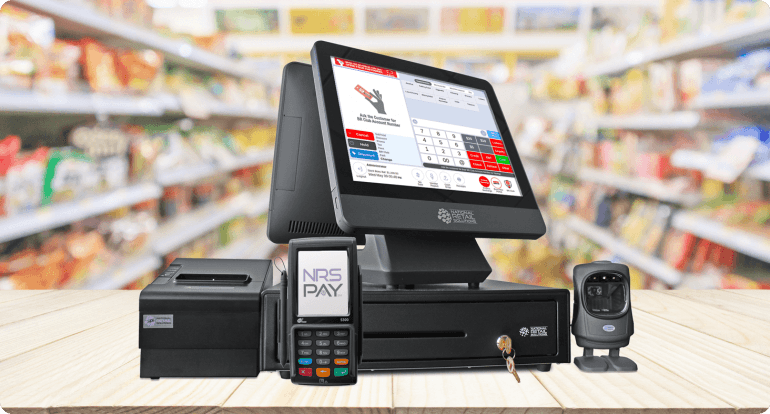
Complete POS System: All-in-One Solution for Modern Businesses
A Complete POS system is more than just a cash register—it’s a powerful all-in-one business management solution that helps you process sales, manage inventory, track customers, and generate real-time reports. Whether you run a retail shop, restaurant, supermarket, pharmacy, or service business, a complete POS system streamlines daily operations and boosts profitability.
In today’s competitive market, businesses need speed, accuracy, and data-driven insights. That’s exactly what a modern complete POS system delivers.
What Is a Complete POS System?
A complete POS system includes both hardware and software required to manage sales transactions efficiently. It integrates multiple business functions into a single platform, reducing errors and saving time.
Typical Components of a Complete POS System
POS software (cloud-based or offline)
Touchscreen POS terminal
Receipt printer
Barcode scanner
Cash drawer
Card payment terminal (optional)
Inventory management module
Sales and reporting dashboard
This complete setup ensures seamless sales processing from checkout to back-office management.
Key Features of a Complete POS System
1. Fast and Accurate Sales Processing
A complete POS system enables quick billing, barcode scanning, and multiple payment options, including cash, card, and mobile payments.
2. Inventory Management
Track stock levels in real time, receive low-stock alerts, and manage product variations with ease. This helps prevent overstocking or stock-outs.
3. Sales Reports and Analytics
Generate detailed daily, weekly, or monthly reports to analyze sales trends, top-selling products, and staff performance.
4. Customer Management
Store customer data, track purchase history, and offer loyalty programs to increase repeat business.
5. Multi-User and Role Management
Assign staff roles, control access levels, and monitor cashier activity to reduce fraud and errors.
6. Cloud and Remote Access
Many complete POS systems offer cloud access, allowing business owners to monitor operations from anywhere.
Benefits of Using a Complete POS System
Improved Efficiency
Automating sales, inventory, and reporting saves time and reduces manual work.
Better Business Decisions
Real-time data and analytics help you make informed pricing, stocking, and marketing decisions.
Enhanced Customer Experience
Faster checkouts, accurate billing, and multiple payment options improve customer satisfaction.
Reduced Errors and Losses
Automation minimizes human errors and helps track discrepancies instantly.
Scalability
A complete POS system grows with your business, supporting multiple branches and locations.
Who Needs a Complete POS System?
A complete POS system is ideal for:
Retail shops and supermarkets
Restaurants, cafes, and bars
Pharmacies and clinics
Hardware and electronics stores
Salons and service businesses
Wholesale and distribution businesses
No matter the business size, a reliable POS system improves control and visibility.
Complete POS System vs Traditional Cash Register
| Feature | Complete POS System | Traditional Cash Register |
|---|---|---|
| Inventory tracking | ✅ Yes | ❌ No |
| Sales reports | ✅ Advanced | ❌ Limited |
| Customer data | ✅ Yes | ❌ No |
| Multi-payment support | ✅ Yes | ❌ Limited |
| Business insights | ✅ Real-time | ❌ None |
A complete POS system clearly outperforms traditional registers in efficiency and functionality.
How to Choose the Right Complete POS System
When selecting a complete POS system, consider:
Business type and size
Ease of use and training
Hardware quality and durability
Software features and scalability
Local support and updates
Integration with accounting or e-commerce platforms
Choosing the right system ensures long-term value and smoother operations.
Why Invest in a Complete POS System Today?
In a fast-paced business environment, relying on manual processes can hold your business back. A complete POS system provides automation, accuracy, and insights that help you stay competitive, reduce costs, and grow faster.
Whether you’re starting a new business or upgrading your existing setup, investing in a complete POS system is a smart, future-proof decision.
Complete POS System Pricing and Packages
The cost of a complete POS system varies depending on the features, hardware, and business size. Businesses can choose from entry-level packages to advanced enterprise solutions.
Factors That Affect Complete POS System Pricing
Type of business (retail, restaurant, pharmacy, supermarket)
Number of users or terminals
Hardware included (printer, scanner, cash drawer)
Cloud-based vs offline POS software
Custom integrations and add-ons
Support, training, and updates
Investing in a complete POS system often results in long-term savings by reducing losses, improving efficiency, and increasing sales accuracy.
Complete POS System for Different Business Types
Complete POS System for Retail Stores
Retail businesses benefit from barcode scanning, stock tracking, discounts, promotions, and customer loyalty management—all in one platform.
Complete POS System for Restaurants
Restaurant POS systems support table management, kitchen order tickets, menu customization, and split billing for smooth operations.
Complete POS System for Supermarkets
Supermarkets require fast checkout, bulk inventory control, and real-time reporting. A complete POS system ensures speed and accuracy during peak hours.
Complete POS System for Pharmacies
Pharmacy POS systems manage drug inventory, batch numbers, expiry dates, and prescription tracking.
Complete POS System for Service Businesses
Salons, clinics, and repair shops can manage bookings, invoicing, customer records, and payments using a complete POS system.
Hardware Included in a Complete POS System
A reliable complete POS system comes with durable and business-ready hardware:
Touchscreen POS terminal or tablet
High-speed receipt printer
Barcode scanner
Cash drawer
Customer display screen
Card payment terminal (optional)
Weighing scale integration (optional)
This ensures smooth and uninterrupted transactions.
Software Capabilities of a Complete POS System
Smart Inventory Control
Real-time stock updates
Supplier and purchase order management
Automatic stock deductions
Expiry and batch tracking
Sales and Tax Management
VAT and tax configuration
Discounts, promotions, and refunds
Multiple payment methods
Offline sales syncing
Business Reports
Profit and loss reports
Sales summaries
Inventory valuation
Staff performance reports
Cloud-Based vs Offline Complete POS System
Cloud-Based POS System
Access data from anywhere
Automatic backups
Multi-branch management
Real-time syncing
Offline POS System
Works without internet
Ideal for areas with unstable connectivity
Data stored locally
Many modern complete POS systems offer hybrid functionality, allowing offline operation with cloud syncing when internet is available.
Security Features in a Complete POS System
Security is a critical factor when choosing a complete POS systems .
A complete POS systems offers:
User access controls
Encrypted transactions
Audit trails
Regular data backups
Secure cloud hosting
This protects business data and prevents unauthorized access.
Benefits of a complete POS systems for Business Growth
Increased operational efficiency
Reduced theft and fraud
Better stock planning
Improved customer loyalty
Accurate financial reporting
Scalable business operations
A complete POS systems transforms daily transactions into strategic business insights.
Frequently Asked Questions (FAQ) – complete POS systems
What is included in a complete POS systems?
Acomplete POS systems includes POS software, hardware, inventory tools, sales reporting, and payment processing capabilities.
Is a complete POS systems suitable for small businesses?
Yes. Small businesses benefit from improved control, faster checkouts, and accurate reporting.
Can a complete POS systems work offline?
Yes. Many systems support offline mode and sync data when internet is restored.
How long does it take to install a complete POS systems?
Installation typically takes a few hours, depending on business size and customization needs.
Final Thoughts: Why Choose a complete POS systems?
A complete POS systems is an essential investment for businesses aiming to improve efficiency, accuracy, and customer satisfaction. With integrated sales, inventory, and reporting tools, it provides everything you need to manage and grow your business effectively.
If you want, I can localize this content for Kenya or Africa, add schema markup (FAQ & product schema), include conversion CTAs, or prepare image prompts for your website.