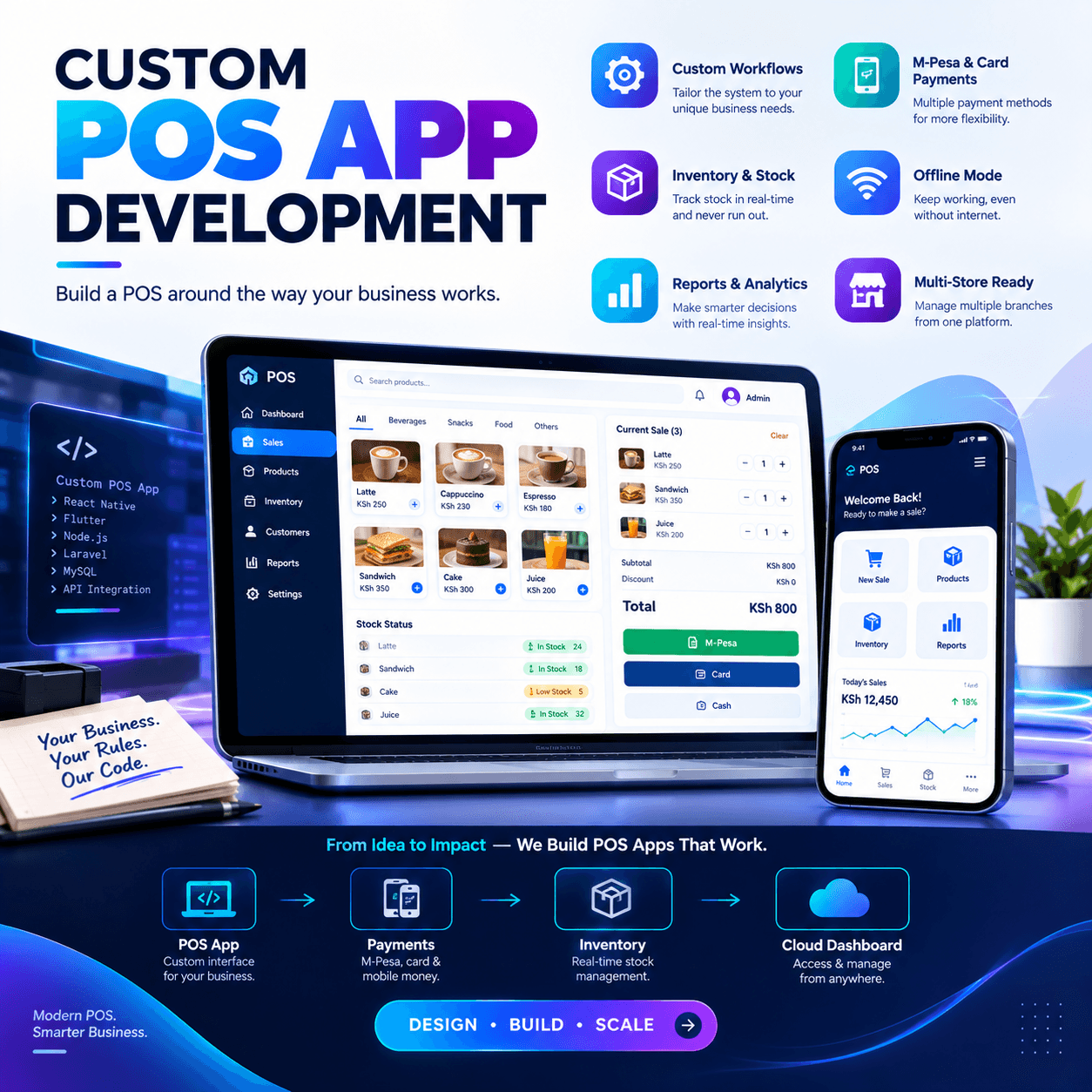
Custom POS app development is what businesses turn to when every ready-made system has finally said no.
No to the pricing rules your trade actually runs on. No to the loyalty programme your customers love. No to the integration your accountant begs for, the report your suppliers need, the workflow your staff perfected over ten years.
Otieno runs an agrovet and pharmacy group. Over five years he tried three off-the-shelf systems, and each one failed him in the same way: not badly enough to abandon, but badly enough to bleed.
Batch numbers that would not travel between branches. Animal-feed units the software simply refused to understand. A discount structure his wholesalers expected and his software could not express.
The day the third vendor told him his request was on the roadmap for next year, he did the arithmetic every owner eventually does: the workaround tax, paid monthly, forever, versus building software that fits. This guide is for owners standing at that same crossroads.
We will walk through what custom building actually involves, when it makes financial sense and when it does not, how the process unfolds stage by stage, what it costs in shillings and months, and how to choose a development partner who will still be answering the phone in year three.
By the end, you will be able to make this decision the way it deserves to be made — with open eyes and a calculator.
What Custom POS App Development Actually Means
Strip away the jargon and the idea is simple: instead of buying software a vendor built for a thousand businesses, you commission software built for yours.
A custom POS app development project produces a point-of-sale application shaped around your products, your pricing, your branches, your payment mix, and your reporting — not the other way round.
It can be a counter terminal for a single shop, a multi-branch platform with a head-office dashboard, or a mobile app for field sales and deliveries.
The key word is ownership. With off-the-shelf software, you are a tenant: you use what the landlord built, and improvements arrive on the landlord’s schedule.
With a custom POS app development engagement, you are the owner: the features you need get built, the ones you do not never clutter the screen, and the roadmap bends to your business rather than the reverse. That distinction — tenant versus owner — is the lens for everything that follows.
Build vs Buy: Is Custom POS App Development Right for You
Every serious build decision starts with an honest audit of what off-the-shelf software cannot do for you.
Write down every workaround your team currently performs: the spreadsheet that patches the reports, the notebook that tracks what the system cannot, the mental rules cashiers memorise because the software cannot express them.
If that list is short, buy. Good ready-made systems exist, and a custom POS app development project would be an expensive way to reproduce what a subscription already delivers.
If the list is long — if workarounds have become a department of their own — the balance tips, because every workaround is a recurring cost that never appears on an invoice.
There is a second test: competitive advantage.
If your way of serving customers is identical to every competitor’s, standard software serves you fine.
But if your edge is a service model nobody else runs — mixed units, trade credit, custom bundles, delivery routing, subscription sales — then standard software actively flattens that edge, and custom POS app development becomes a way to weaponise it.
The third test is longevity.
Software you rent can be repriced, discontinued, or acquired; the vendor’s decisions become your emergencies.
Software you own answers to one roadmap: yours.
Who Should Invest in Custom POS App Development
The category is not for everyone, and pretending otherwise is how bad projects begin.
It fits businesses whose operations are genuinely different: pharmacies with batch and expiry discipline, hardware merchants selling by piece and metre and carton, distributors managing route sales and customer credit, retailers whose loyalty mechanics go beyond points.
It fits multi-branch groups whose reporting needs outrun generic dashboards — where a custom POS app development project can encode your exact group logic into every report.
And it fits businesses sitting on unique processes that competitors cannot easily copy, because the software itself becomes the moat.
It does not fit businesses in their first year still discovering their own workflows.
Rules that are not yet stable cannot be coded; you would be building on sand and paying engineer rates to move the sand monthly.
It also does not fit owners who want software but actually need discipline — no application fixes unrecorded transfers or skipped stock counts.
The right candidate for custom POS app development has stable processes, a real competitive difference, and the patience to specify what they want. If that is you, keep reading. If it is not yet you, this guide will still tell you what to prepare.
The Discovery Phase: Where Projects Are Won or Lost
Every strong build begins with discovery, and weak builds skip it — a correlation so reliable it amounts to a law.
Discovery is the structured weeks where the development team studies your operation: your products and units, your pricing and promotions, your branches and roles, your payment flows, your reports, and the workarounds you have normalised.
The output is a specification document — the blueprint every later decision refers back to.
Judge any custom POS app development proposal by the depth of its discovery, because features are cheap to promise and expensive to misunderstand.
A serious team will interview your cashiers, not just you; the counter is where the truth about workflows lives.
They will shadow a full trading day, collect your existing reports, and ask about edge cases until you are slightly tired of the questions.
That tiredness is the point: every ambiguity resolved in discovery costs minutes, while the same ambiguity discovered at launch costs weeks.
Before signing anything, insist that the custom POS app development specification is written in plain language you fully understand — because you will be held to it, and it will hold the developer to it, for the life of the project.
Designing the App: Screens Before Software
Once the blueprint exists, design translates it into screens — and this stage deserves more of your attention than most owners give it.
Good design asks: what does a cashier see at 1 p.m. with eight customers queuing?
The answer should be speed — big buttons, sensible order, zero hunting through menus — because design that ignores the rush hour is decoration, not design.
Review clickable mockups of every core screen: the sale screen, refunds, stock receiving, the manager’s dashboard, the reports you will actually read.
A capable custom POS app development team puts these mockups in front of your real staff before a line of code is written, because the people who will live in the software should approve its shape.
Insist on this review with your own team, not a demo of somebody else’s.
Two practical rules worth enforcing: every common task must be reachable in two taps or fewer, and every screen must make the correct action the easiest action.
When the mockups feel obvious — when your cashier says of course it works this way — the design is done.
That feeling of obviousness is expensive to produce and is the clearest early signal of a custom POS app development project that will land well.
The Technology Stack: Choices You Will Live With
You do not need to be an engineer, but you should understand the four decisions that shape your app for years
First, platform: tablet, desktop terminal, phone, or some combination.
Most modern builds are tablet-first with phone apps for owners and field staff — flexible, affordable, and easy to replace.
Second, architecture: cloud-backed with local capability, or purely local.
For Kenyan trading conditions the answer is settled — a serious custom POS app development project is offline-first, storing everything locally and syncing to the cloud when connectivity allows, because your till must never wait for a router.
Third, integrations: M-Pesa, card processors, accounting tools, SMS gateways, e-commerce.
Each integration is a promise about other people’s systems; a competent team confirms each one is technically possible before promising it in the spec.
Fourth, the source code itself: which languages and frameworks, whether they are mainstream or exotic, and whether another developer could take over if needed.
Mainstream technology is a safety feature — insist on it, and ask your custom POS app development partner to explain their stack in plain language until you can repeat it to a colleague.
You are not choosing the stack; you are choosing the team whose stack choices you can live with for five years.
The Features Worth Building
Here is where custom building pays its rent: the feature list is yours, so build deliberately.
Start with the core that every till needs — fast scanning and checkout, receipts, cash management, user logins with permissions, refunds with approval trails.
Then add the layer that justifies the project: the features no box product gave you.
For Otieno it was batch tracking that flowed between branches, feed units sold by sack and scoop, and wholesaler price tiers the system understood natively.
For a pharmacy it is expiry-first dispensing; for a distributor it is route-day ordering with customer credit limits enforced at the point of sale.
A disciplined custom POS app development process ranks every requested feature as essential, valuable, or someday — and builds in that order. Resist the temptation to build everything before launch.
Every feature added before first use is a guess; every feature added after a month of real trading is a decision.
The essential set should be small enough to launch within months and complete enough that staff never need the old workarounds — that balance is the craft of a good custom POS app development specification.
Everything else goes on the someday list, where it can wait for evidence.
Offline-First: Non-Negotiable in Our Market
One requirement deserves its own section because it separates professional builds from hobby projects: the app must trade through internet failures.
Offline-first means the application holds your catalogue, prices, and stock locally; completes every sale, receipt, and stock movement without connectivity; queues each transaction durably; and syncs everything to the cloud in order once the network returns.
Anything less — an app that freezes or downgrades to survival mode when the fibre is cut — is not finished, whatever the invoice says.
Make this a written acceptance criterion of your custom POS app development contract, with a test to match: mid-sale disconnection, offline refund, clean resync, verified stock counts.
It is a two-minute test that exposes months of corner-cutting. Power resilience belongs in the same clause — tablets on battery, printers connected directly, nothing depending on cloud print services.
And the sync behaviour must be automatic, with no button a cashier will forget to press at 9 p.m.
Vendors abroad sometimes treat offline as an edge case; a custom POS app development partner who understands local trading treats it as the foundation and will demo it unprompted. If they do not, ask why — and watch how fast the answer arrives.
Payments: M-Pesa, Cards, and Cash in One Flow
Your app’s payment layer is where custom building delivers daily, visible value.
The baseline: cash, card, and mobile money all recorded against each sale on one screen, with split payments handled in seconds and end-of-day reconciliation that adds up without detective work.
The custom advantage is depth — a custom POS app development project can wire M-Pesa confirmation directly against each transaction, matching payments to sales automatically instead of by cross-checking phones at closing time.
It can also encode your credit rules: approved customer accounts with limits enforced at the till, repayment tracking visible to the cashier before the next sale on account.
Cash discipline deserves explicit design too — drawer counts per shift, discrepancies flagged by name, every override stamped and searchable.
Agree the payment specification in writing during discovery, because payments are the one area where almost is useless.
A payment that works ninety-five percent of the time is a queue of unhappy customers and a reconciliation nightmare.
The test at handover is simple and absolute: take a cash sale, a card sale, an M-Pesa sale, and a split payment on launch day — a custom POS app development handover that passes all four is a handover you can trust.
How Long Custom POS App Development Takes
Honest timelines build trust, so here is the realistic shape of a professional project.
Discovery and specification: two to four weeks for a business of typical complexity — interviews, shadowing, the blueprint document, and your sign-off.
Design and mockups: two to three weeks, overlapping with late discovery, ending with staff-approved screens.
Core build: eight to fourteen weeks depending on feature depth, with working software demonstrated to you every two weeks — not a silent three-month silence followed by a reveal.
Testing, data migration, and training: two to four weeks, including the unplugged offline test and a parallel run against your old process.
Added honestly, a focused single-location build typically lands in four to six months; a multi-branch platform with head-office reporting runs six to nine.
Be suspicious of anyone promising a full custom POS app development project in six weeks — the schedule was fantasy or the feature list is thinner than it sounds. Equally, be suspicious of open-ended timelines with no fortnightly demonstrations.
The healthiest signal a custom POS app development team can give you is momentum you can see: every fortnight, real software on a real device, doing a little more than the fortnight before.
Time in this game is not measured in promises; it is measured in demos.
What Custom POS App Development Costs
Let us talk money honestly, because vague pricing breeds bad decisions in both directions.
Costs arrive in four layers: the discovery and specification, the build itself, the launch phase of migration and training, and then ongoing maintenance.
A focused single-location build from a professional regional team typically runs from the low millions of shillings upward; a multi-branch platform with custom reporting runs considerably more.
Any custom POS app development quote that arrives as a single number, same-day, without discovery, is a guess wearing an invoice — and you will pay for the guess later. The honest comparison is never build cost versus zero.
It is build cost versus the lifetime subscription fees you would otherwise pay, plus the workaround tax your team currently pays monthly, plus the value of the features no vendor would ever build you.
Run that arithmetic across five years and the picture usually inverts: ownership is cheaper than renting, provided the software actually gets used.
Protect yourself contractually: fixed price against the specification, payment tied to accepted milestones, and a defined change-request process so new ideas are priced transparently instead of silently inflating.
A custom POS app development partner confident in their estimate will accept milestone-based payment without flinching.
One who insists on large sums upfront, before discovery, is telling you who bears the risk in their model — make sure it is not you.
Choosing a Custom POS App Development Partner
The partner matters more than the pitch, so vet them like the hire they are.
Look first at proof: live systems running in businesses like yours, visited or called, with owners who answer questions willingly.
Ask every candidate the three questions that end pretenders quickly: show me an app you built trading offline; show me an app you have maintained for three years; and give me two clients you built for in the last two years.
A capable custom POS app development partner answers with demonstrations, not descriptions.
Local presence matters more in this trade than most — an international team building blind to M-Pesa realities, power cuts, and how cashiers actually work will produce technically elegant software that fails on Monday morning.
Meet the actual developers, not only the salesperson; the person pitching and the person building should at least know each other’s names.
Probe their process: discovery document, design sign-off, fortnightly demos, staged payments, acceptance testing, warranty period, and a maintenance agreement with response times. A serious custom POS app development proposal contains all seven items unprompted.
Finally, check ownership terms before signing: the contract must state plainly that you own the source code and the data, delivered to you at completion or held in escrow.
Ownership you have not secured in writing is ownership you do not have.
The Development Journey, Stage by Stage
Hre is what the project actually feels like once signed, so nothing surprises you.
It opens with a kickoff and discovery: the team embeds with your operation, and your main job is honesty — show them the workarounds, not the official process.
Then specification sign-off, the moment the project becomes real: a document describing what will be built, in language you understand, priced against milestones.
Design follows, then the build in fortnightly increments — each demo a chance to correct course cheaply while correction is still cheap.
A disciplined custom POS app development process never goes dark; silence for weeks is a project risk, not a sign of hard work.
Mid-build, your team prepares data: the product catalogue, prices, opening stock, and customer lists, cleaned while the developers build — because migration day is not the day to discover your spreadsheet has three spellings of the same supplier.
Launch is staged: install, migrate, train on real hardware with the router unplugged, run parallel with the old process for days, compare totals, then cut over on a normal trading day.
After launch comes the warranty window, typically thirty to ninety days, where defects are fixed at no charge — a custom POS app development handover that ends at the invoice rather than the warranty is a handover to avoid.
Through all stages, remember whose project it is: your decisions, requested promptly, keep it moving.
Testing Before Launch: The Fortnight That Protects the Year
Testing is where amateur projects shrug and professional projects insist — learn the difference before your launch day.
It begins with the developer’s own testing, but their testing proves the software works as specified; yours proves the specification was right.
Run the acceptance list from the contract on your own devices: every sale type, every refund path, every discount rule, every payment method, the unplugged offline test, and every report you specified.
A rigorous custom POS app development handover includes this session with your staff, defects logged live and fixed on a schedule you both see.
Then run the parallel: new system and old process side by side for three to five trading days, totals compared nightly.
Parallel running feels redundant right up until it catches the one pricing rule that translated incorrectly — the catch that saves a month of trust.
Train for the edge cases deliberately: refund without receipt, power cut mid-sale, the customer with three payment methods and strong opinions.
A team rehearsed on a custom POS app development launch day greets real chaos with procedure instead of panic.
Launch when the parallel totals match and the defect list is empty — not when the calendar says so. A launch held a week for quality is a week bought; a launch rushed past red flags is a quarter spent repairing.
Ownership: Source Code, Data, and the Exit Door
The contractual section nobody enjoys and everybody needs — read this one twice.
Your agreement must state, in unambiguous words, three things.
One: you own the source code, delivered at completion or held in escrow, released if the developer ceases trading.
Two: you own your data — sales, stock, customers — exportable in a usable format at any time, not held hostage in a proprietary vault.
Three: the intellectual property in your workflows is yours; the developer’s reusable libraries and tools may remain theirs, but nothing specific to your business lives only on their servers.
A professional custom POS app development contract contains all three clauses as standard, and a partner who resists them has told you something important at the cheapest possible moment.
Ask also about continuity: if the relationship ends in year three, who maintains the app, and at what hourly or monthly rate?
An app without a maintenance path is a car without a mechanic — drivable until the first rattle, then a very expensive sculpture.
The healthiest arrangements name a successor scenario in advance, with documentation and handover support defined.
You will likely never need it — most custom POS app development partnerships that begin with clear terms run for years — but the exit door you never use is still worth owning.
Security loves certainty; so do sleep and audits.
Life After Launch: Maintenance and Evolution
Launch is the midpoint, not the finish line, and budgeting for what follows is part of the honest cost.
Every working application needs maintenance: operating system updates on devices, security patches, integration changes when M-Pesa or card processors revise their systems, and small fixes as real trading reveals real edges.
Plan on a monthly maintenance agreement from day one — a defined sum covering response times, monitoring, and a standing allowance of small changes.
Owners who skip maintenance do not avoid the cost; they defer it, with interest, to the Tuesday the app will not print.
Beyond maintenance lies evolution: the someday list from your specification, re-ranked monthly by what real usage teaches you.
A healthy custom POS app development relationship includes a quarterly review — usage reports, staff feedback, and a short list of improvements priced before building.
This cadence is where custom software pulls away from boxed software: your app compounds advantages specific to your business instead of converging on everyone’s average. Guard the discipline, though — change without evidence is how budgets drown.
The strongest custom POS app development owners treat their backlog like a stock room: items enter with a reason, leave with a result, and nothing sits unexamined for a year.
Do that, and the app you commissioned keeps becoming the app you actually need.
Mistakes That Sink Custom Projects
Most failed builds fail in one of five familiar ways — learn them secondhand here.
Skipping discovery to save a month. The specification is the contract between your business and the code; skip it and every later disagreement is decided by whoever is more stubborn. A custom POS app development project without discovery is a renovation without measurements.
Building everything before launch. The eighteen-feature first release arrives late, half the features go unused, and the evidence that would have guided you never gets collected. Launch small, learn fast, add deliberately.
Choosing on price alone. The cheapest bid is usually the thinnest: no discovery, no testing phase, no warranty, no maintenance — the costs are not absent, only postponed.
Ignoring the staff until launch. Cashiers excluded from design will work around the app exactly as they worked around the last system, and the reports will inherit the noise.
Every successful custom POS app development we have seen put counter staff in the design reviews from the first mockup.
No ownership terms and no exit plan. The relationship ends eventually — every business relationship does — and the contracts signed on day one decide whether the ending is a handover or a hostage situation.
Five mistakes, all avoidable, and avoiding them costs nothing but attention. That is the cheapest project insurance on the market.
Custom POS App Development vs Off-the-Shelf Software
Let us set the two paths side by side honestly, because both have real virtues.
Off-the-shelf wins on speed — live in days — and on price at entry, with proven features and a support community already using them.
It loses on fit: your special processes become workarounds, your roadmap is the vendor’s roadmap, and your monthly rent is paid forever.
Custom loses on speed and entry price — months and a larger upfront sum — and wins on fit, ownership, and the compounding value of software shaped to your edge.
The crossover point differs by business, which is why the custom POS app development decision must be run on your arithmetic, not a blog’s rule of thumb.
Here is the honest rule: if a good off-the-shelf system covers eighty percent of your needs and the missing twenty percent costs little to work around, buy.
If the missing twenty percent is your competitive advantage, or the workarounds employ a person’s worth of hours monthly, build.
And there is a middle path worth knowing: configure-first platforms that allow meaningful customisation without full construction — sometimes the custom POS app development conversation ends with a hybrid that captures most of the value at a fraction of the build.
A trustworthy partner will tell you when the hybrid is the right answer. One who tells you everything requires a full build has confused consulting with selling.
Security and Compliance
Software that holds your money data must be built to defend it — make security a specification item, not a hope.
Insist on the fundamentals in writing: encryption for data at rest and in transit, per-user logins with role-based permissions, approval trails on every sensitive action, and automatic daily backups tested by actually restoring one.
Ask your custom POS app development partner how the app would survive a stolen terminal — the correct answer involves encrypted local data and remote deactivation, delivered without hesitation.
Access discipline is half the system: unique logins, immediate deactivation for leavers, no shared passwords, screens that lock themselves.
Compliance belongs in the same conversation — tax-ready records, clean exports for your accountant, and any e-invoicing requirements your sector carries, designed in from discovery rather than bolted on later.
Ask to see the security section of the specification before signing; a professional document has one, described in plain language.
And after launch, make security patching a named line in the maintenance agreement, because threats evolve and software that stands still falls behind.
A secure custom POS app development outcome is not luck — it is a checklist, written early and tested at handover like everything else.
Growing With Your App
The app that fits you today should fit the business you intend to become — plan that trajectory now, while changes are cheap.
Raise the growth questions in discovery: if branches double, does the architecture hold; if transaction volume triples, what breaks first; if you open in a new town with weak connectivity, how does the app cope?
A custom POS app development build designed with headroom answers these calmly; one built for only today’s shape will need surgery at the worst possible time.
Growth features worth pre-wiring even if you do not build them yet: multi-branch support in the data model, an API so other tools can connect later, and export formats your future accountant will love.
None of this costs much at design stage; all of it costs plenty at rebuild stage. The same logic applies to your team’s skills — train a second power user beyond yourself, so the app’s knowledge lives in the business and not in one head.
Owners who scale successfully on a custom POS app development foundation share one habit: they revisit the roadmap quarterly against where the business actually went.
Software that grows with you is not an accident of good luck. It is the compound interest of decisions made early, cheaply, and on purpose.
Five Signs You Are Ready to Build
Before we close with questions, a candid checklist — five signs that the timing is genuinely right.
One: your processes are stable and documented, because software can only automate what is true.
Two: the workarounds have a monthly cost you can name — in hours, in leakage, in lost deals.
Three: a good off-the-shelf system has been genuinely tried or seriously evaluated, and the gap is real.
Four: you can fund the build and the first year of maintenance without strain, because a starved project fails twice — once at launch and once at morale.
Five: you have a partner candidate who passed the offline demo, the reference calls, and the ownership-terms conversation.
If all five describe you, a custom POS app development project is not a gamble; it is the logical next line in your business plan.
If four describe you, fix the fifth before signing — readiness is a package deal.
And if fewer than three describe you, that is valuable knowledge too: the roadmap for the next year is to stabilise processes and revisit.
Honest timing converts the same project from a risk into an advantage — which is exactly what a well-timed custom POS app development investment should feel like from day one.
Frequently Asked Questions
How much does custom POS app development cost?
A focused single-location build from a professional team typically starts in the low millions of shillings, with multi-branch platforms scaling upward from there depending on feature depth.
The honest comparison is five-year total cost: build plus maintenance versus subscriptions plus workarounds plus features you could never buy — a custom POS app development quote should always be evaluated on that full arithmetic, never on the invoice alone.
How long does a typical project take?
Four to six months for a single location and six to nine for a multi-branch platform, measured from signed specification to launch.
The reliable signal of a healthy custom POS app development timeline is a working demo every fortnight; open-ended silence is the reliable signal of trouble.
Can a custom app work offline like good off-the-shelf systems?
Yes — and it should be non-negotiable, with offline-first architecture written into the contract as an acceptance criterion.
Insist on the live test at handover: mid-sale disconnection, offline refund, clean resync, verified stock — a custom POS app development delivery that passes has earned its keep before the first real outage.
Who owns the source code and my data?
You do — provided the contract says so, which is why it must, in writing, before signing.
Source code delivered or escrowed, data exportable at any time, and workflows recognised as yours: any custom POS app development agreement missing these three clauses is missing the whole point of building.
Can it integrate with M-Pesa, accounting tools, and our existing systems?
Yes, and integrations are often the strongest argument for building — but each must be confirmed technically possible during discovery, not promised at the pitch.
The acceptance test is simple: a cash sale, a card sale, an M-Pesa sale, and a split payment completing cleanly on launch day — a custom POS app development handover that passes all four is a platform you can run a business on.