 Vega
Vega Point of Sale Software: Everything You Need to Know Before Choosing the Best POS System
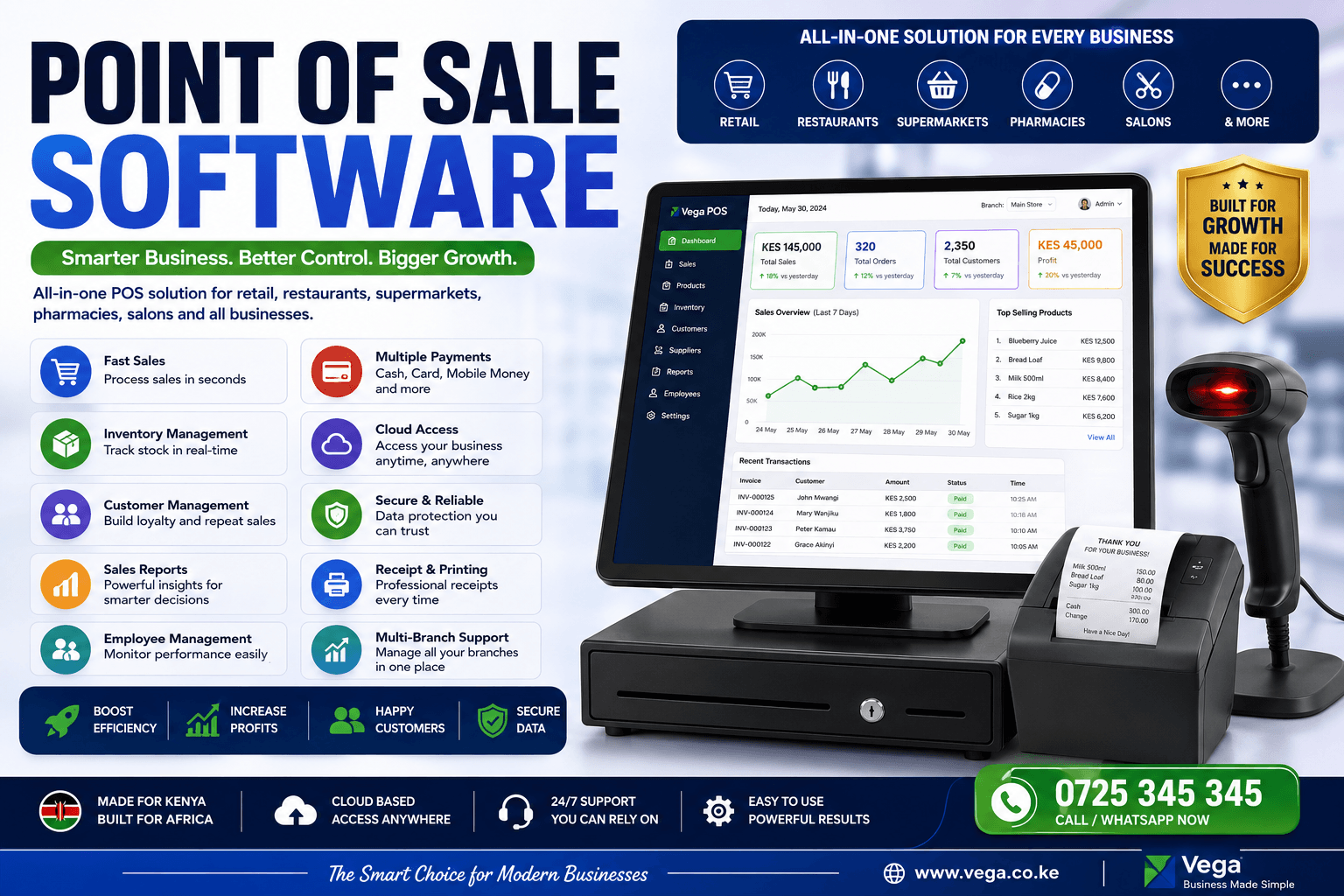
Running a successful business today requires more than selling products or services. Customers expect fast checkout, multiple payment options, accurate receipts, efficient inventory management, and excellent customer service. Managing these operations manually often results in long queues, stock losses, inaccurate financial reports, and poor customer experiences.
This is why Point of Sale Software has become an essential investment for businesses of every size.
Whether you own a supermarket, retail shop, electronics store, pharmacy, restaurant, café, hardware store, salon, liquor shop, boutique, wholesale business, or service company, the right POS software helps automate daily operations while giving you complete control over sales, inventory, staff, customers, and profits.
In this comprehensive guide, you’ll learn everything about Point of Sale Software, including its features, benefits, industries that use it, and how to choose the right system for your business.
What is Point of Sale Software?
Point of Sale Software (POS Software) is a digital system that allows businesses to process sales, manage inventory, generate receipts, accept payments, monitor employees, and produce business reports from one centralized platform.
Instead of relying on notebooks, spreadsheets, or separate systems, a POS solution connects every aspect of your business into one easy-to-use platform.
Modern POS systems can operate on:
- Desktop computers
- Tablets
- Mobile phones
- Touchscreen terminals
- Cloud-based platforms
- Multi-branch business environments
The software records every transaction automatically while updating inventory, customer information, and financial reports in real time.
Why Every Business Needs Point of Sale Software
Businesses lose money every day because of:
- Manual stock counting
- Missing sales records
- Employee theft
- Pricing errors
- Slow checkout processes
- Inaccurate inventory
- Lack of business reports
Point of Sale Software eliminates these problems by automating business operations.
Instead of spending hours balancing sales, checking stock, or preparing reports, business owners can focus on growth.
Key Features of Modern Point of Sale Software
Fast Sales Processing
The software enables staff to process customer purchases within seconds using barcode scanners, product search, or touch-screen menus.
Benefits include:
- Faster checkout
- Reduced queues
- Better customer experience
- Accurate pricing
Inventory Management
Inventory updates automatically after every sale.
Features include:
- Real-time stock levels
- Low-stock alerts
- Purchase tracking
- Supplier management
- Batch management
- Product categories
- Barcode generation
Barcode Scanning
Barcode support speeds up transactions while reducing pricing mistakes.
Businesses can:
- Print barcode labels
- Scan products instantly
- Search products quickly
- Manage thousands of items
Customer Management
Build stronger customer relationships through:
- Customer profiles
- Purchase history
- Loyalty programs
- Reward points
- Credit limits
- Customer balances
Sales Reports
Business owners gain access to reports such as:
- Daily sales
- Weekly sales
- Monthly revenue
- Annual performance
- Product performance
- Staff performance
- Branch comparison
- Profit reports
These reports help make informed business decisions.
Employee Management
Track employee activity by monitoring:
- Sales made
- Refunds processed
- Discounts issued
- Login history
- Working hours
- Permissions
Role-based access ensures employees only access authorized sections.
Multi-Payment Support
Modern Point of Sale Software supports:
- Cash
- Credit cards
- Debit cards
- Mobile Money
- Digital wallets
- Bank transfers
- Gift cards
- Split payments
Multi-Branch Management
For businesses with multiple locations, cloud POS software allows management of all branches from one dashboard.
Managers can compare:
- Sales
- Inventory
- Employees
- Expenses
- Profits
Across every branch.
Expense Tracking
Monitor business expenses including:
- Rent
- Utilities
- Salaries
- Purchases
- Transport
- Repairs
This provides a clearer picture of profitability.
Supplier Management
Manage supplier information including:
- Purchase orders
- Outstanding balances
- Payment history
- Delivery records
- Supplier contacts
Purchase Management
Track incoming inventory by recording:
- Purchases
- Supplier invoices
- Stock received
- Purchase returns
- Purchase costs
Promotions and Discounts
Run promotional campaigns with:
- Percentage discounts
- Fixed discounts
- Buy One Get One offers
- Seasonal promotions
- Coupon codes
Receipt Printing
Generate professional receipts showing:
- Business details
- Purchased items
- Taxes
- Discounts
- Payment method
- QR codes
- Return policy
Receipts can also be emailed or sent via SMS.
Cloud Backup
Cloud-based POS systems securely store data online.
Benefits include:
- Automatic backups
- Remote access
- Disaster recovery
- Multi-device synchronization
Industries That Use Point of Sale Software
Point of Sale Software works for nearly every business.
Examples include:
- Supermarkets
- Grocery stores
- Restaurants
- Cafés
- Hotels
- Pharmacies
- Electronics shops
- Fashion boutiques
- Furniture stores
- Hardware stores
- Bookshops
- Gift shops
- Liquor stores
- Cosmetics stores
- Beauty salons
- Barber shops
- Car spare shops
- Service centers
- Pet stores
- Bakeries
- Wholesale businesses
- Mobile phone shops
- Agricultural supply stores
Benefits of Point of Sale Software
Improve Business Efficiency
Automation eliminates repetitive manual work.
Employees spend less time on paperwork and more time serving customers.
Reduce Human Errors
Automated calculations prevent:
- Pricing mistakes
- Incorrect stock updates
- Wrong totals
- Duplicate entries
Increase Revenue
Businesses grow faster because they:
- Sell faster
- Avoid stock shortages
- Understand customer buying behavior
- Identify best-selling products
Better Inventory Control
Know exactly:
- What is selling
- What isn’t selling
- Which products need reordering
- Inventory valuation
Better Decision Making
Comprehensive reports help owners make informed decisions based on real data.
Enhanced Customer Experience
Customers enjoy:
- Faster checkout
- Accurate pricing
- Digital receipts
- Loyalty rewards
- Flexible payment options
Cloud POS vs Traditional POS
Cloud POS
Advantages:
- Access anywhere
- Automatic updates
- Remote management
- Lower maintenance
- Easy backups
Ideal for growing businesses.
Traditional POS
Advantages:
- Local installation
- No internet dependency for local operations
- Full control over local infrastructure
Suitable for businesses with specific offline requirements.
How to Choose the Best Point of Sale Software
Before purchasing POS software, consider:
Ease of Use
Choose software that employees can learn quickly.
Scalability
The system should support business growth without requiring replacement.
Reporting
Look for comprehensive business intelligence dashboards.
Security
Ensure:
- User permissions
- Data encryption
- Secure backups
- Audit trails
Integrations
The best POS systems integrate with:
- Accounting software
- E-commerce platforms
- CRM systems
- Payment gateways
- Barcode scanners
- Receipt printers
- Cash drawers
Mobile Compatibility
Business owners should monitor operations using smartphones or tablets.
Customer Support
Reliable technical support ensures minimal downtime.
Common Mistakes Businesses Make When Choosing POS Software
Avoid systems that:
- Cannot scale
- Lack reporting
- Have poor security
- Don’t support inventory
- Have no backups
- Require excessive manual work
- Offer limited customer support
Future Trends in Point of Sale Software
The future of POS includes:
- AI-powered sales forecasting
- Automated inventory replenishment
- Contactless payments
- QR code ordering
- Self-service kiosks
- Voice-enabled reporting
- Mobile POS terminals
- Customer behavior analytics
- Omnichannel retail integration
- Real-time business intelligence
Businesses adopting these technologies gain a significant competitive advantage.
Frequently Asked Questions
What is Point of Sale Software?
It is software that helps businesses process sales, manage inventory, customers, payments, employees, and reporting from one centralized system.
Can POS Software work offline?
Yes. Many modern POS systems continue processing sales offline and automatically synchronize data once the internet connection is restored.
Is POS Software suitable for small businesses?
Absolutely. Small businesses benefit from improved efficiency, accurate stock management, and professional reporting without needing complex infrastructure.
Can I manage multiple branches?
Yes. Cloud-based Point of Sale Software allows you to monitor sales, inventory, and staff across multiple locations from a single dashboard.
Does POS Software support barcode scanners?
Yes. Most modern systems integrate with barcode scanners, receipt printers, cash drawers, weighing scales, and other retail hardware.
Final Thoughts
Choosing the right Point of Sale Software is one of the smartest investments a business can make. It streamlines sales, improves inventory accuracy, enhances customer satisfaction, and provides valuable insights that help drive growth.
Whether you run a retail store, restaurant, pharmacy, supermarket, salon, or wholesale business, implementing a modern POS system enables you to automate daily operations, reduce errors, increase profitability, and scale with confidence.
As businesses continue embracing digital transformation, cloud-based Point of Sale Software will remain a critical tool for improving efficiency, supporting better decision-making, and delivering exceptional customer experiences.