 Vega
Vega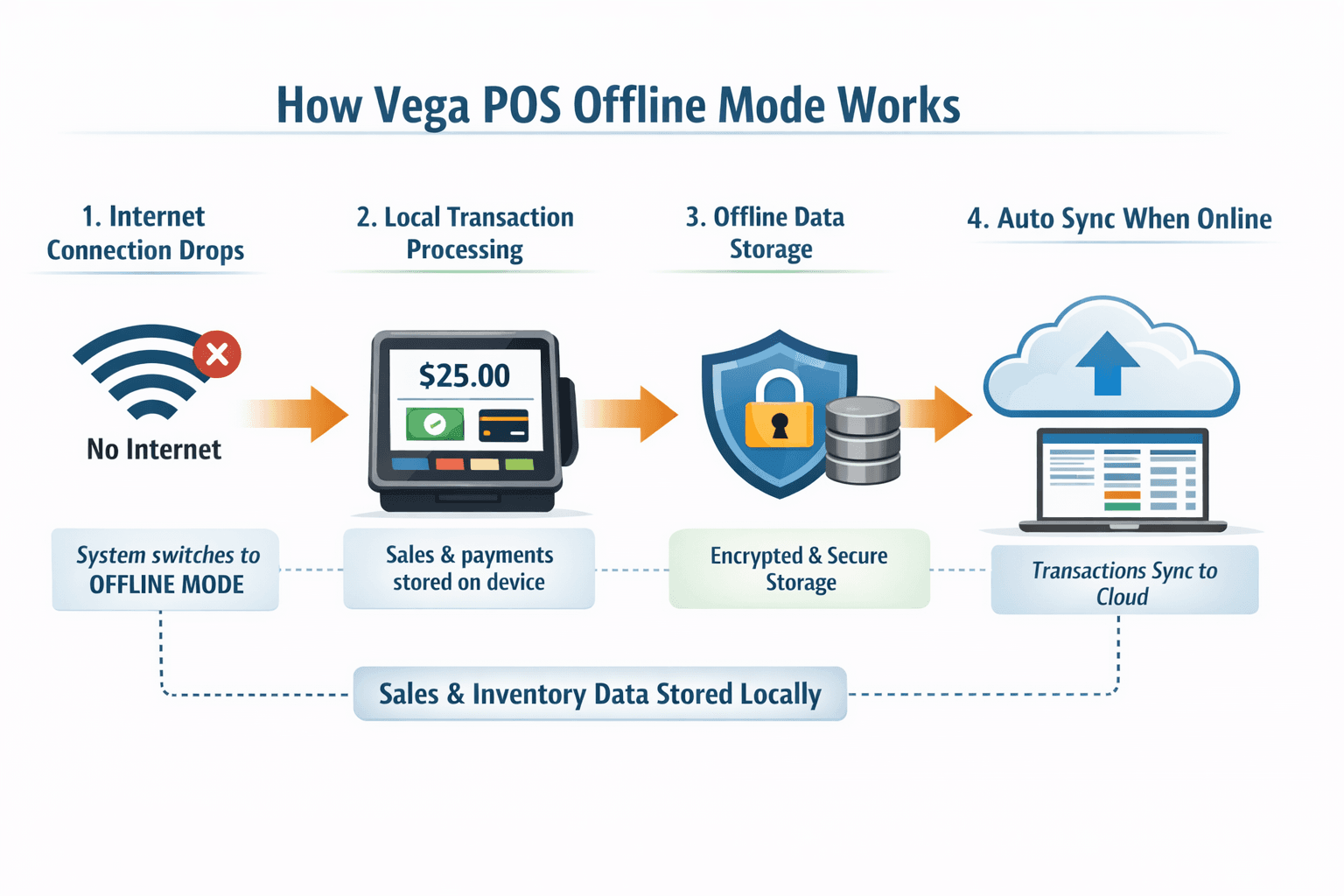
Table of Contents
ToggleVega POS Offline Mode: Seamless Sales Even Without Internet
Running a business requires a point-of-sale (POS) system that is reliable, fast, and versatile. One of the standout features of Vega POS is its offline mode, designed to ensure your business never stops, even when the internet goes down.
What is Vega POS Offline Mode?
Vega POS offline mode allows your store to continue processing sales, tracking inventory, and generating receipts without an active internet connection. This feature is essential for businesses in areas with intermittent connectivity or for merchants who rely on consistent operations.
Benefits of Using Vega POS Offline Mode
Uninterrupted Sales Processing
With offline mode, transactions are saved locally on the device and synced automatically once the internet is restored. This means no lost sales and no frustrated customers.Real-Time Inventory Management
Vega POS offline mode tracks product stock levels even while offline. When the system reconnects, inventory updates are synchronized across all devices and the cloud, maintaining accurate records.Secure Data Handling
Transactions completed offline are encrypted and stored securely, preventing data loss. Once back online, the system uploads information safely to your cloud account.Enhanced Customer Experience
Customers don’t have to wait for a slow or unstable internet connection. Fast and seamless checkout keeps your service professional and efficient.
How Vega POS Offline Mode Works
Vega POS’s offline mode is designed to be intuitive:
Step 1: When internet connectivity drops, the system automatically switches to offline mode.
Step 2: Sales, payments, and receipts are recorded locally on the device.
Step 3: Once connectivity is restored, all transactions are synchronized with the central system, ensuring accurate sales and inventory data.
Ideal Businesses for Vega POS Offline Mode
Retail stores in areas with unreliable internet
Restaurants and cafes that need continuous order processing
Pop-up shops, events, and mobile vendors
Small businesses that cannot afford downtime
Why Choose Vega POS for Offline Operations?
Vega POS combines robust offline functionality with a user-friendly interface, making it an ideal choice for businesses of all sizes. Its offline mode ensures:
No disruption in daily operations
Accurate sales and inventory tracking
Secure and automatic data synchronization
Hassle-free offline payments and receipts
Conclusion
With Vega POS offline mode, businesses can maintain productivity, accuracy, and customer satisfaction, even in the absence of internet connectivity. Choosing Vega POS means choosing reliability, flexibility, and uninterrupted operations.
Vega POS Offline Mode: Keep Your Business Running Anytime, Anywhere
In today’s fast-paced retail and hospitality environments, uninterrupted operations are crucial. Network outages, slow internet, or temporary connectivity issues can lead to lost sales, frustrated customers, and inaccurate records. Vega POS offline mode solves these problems by allowing your business to continue running seamlessly, even when you’re offline.
What is Vega POS Offline Mode?
Vega POS offline mode is a feature that enables your point-of-sale system to function without an active internet connection. Unlike traditional POS systems that halt operations during connectivity issues, Vega POS stores transactions locally on your device and syncs them automatically once the network is restored.
This ensures that your business stays operational, your inventory stays accurate, and your customer experience remains smooth.
Key Features of Vega POS Offline Mode
Seamless Transaction Processing
Vega POS offline mode allows sales to continue without interruptions. You can process cash, card, and digital payments while offline. Once the system reconnects, all transactions are automatically uploaded to your main database.Real-Time Inventory Tracking
Every product sold while offline is recorded locally. Once back online, the inventory updates across all devices, ensuring accurate stock levels and preventing overselling.Automated Synchronization
Offline transactions are synced automatically when internet connectivity is restored. This eliminates manual reconciliation and reduces the risk of human error.Data Security
All offline transactions are encrypted and stored safely on the device. Vega POS ensures your data remains secure, preventing loss or tampering.User-Friendly Interface
The offline mode operates seamlessly within Vega POS’s intuitive dashboard. Staff can continue to create orders, print receipts, and manage customer data without interruption.
How Vega POS Offline Mode Works: Step-by-Step
Automatic Offline Detection
When your internet goes down, Vega POS switches to offline mode automatically. There’s no need to manually activate it.Local Data Storage
All transactions, including sales, payments, and returns, are stored locally on your device.Offline Payment Support
Payments via cash or card terminals that can work offline are recorded accurately.Sync Once Online
When the internet connection is restored, Vega POS automatically synchronizes all stored transactions with your central system, updating inventory, sales records, and financial reports.
Benefits of Vega POS Offline Mode
1. Never Lose a Sale
Even during unexpected network outages, offline mode ensures that every sale is recorded and completed.
2. Accurate Inventory Management
Offline transactions are not lost, which means stock levels stay accurate, preventing shortages or overselling.
3. Enhanced Customer Experience
Customers enjoy fast and uninterrupted checkout, making your business more reliable and professional.
4. Flexible for Any Business
Whether you run a retail store, restaurant, cafe, pop-up shop, or mobile vending business, Vega POS offline mode ensures smooth operations anytime.
Who Should Use Vega POS Offline Mode?
Retail Stores – Avoid losing sales due to internet downtime.
Restaurants and Cafes – Keep orders flowing even during connectivity issues.
Pop-up Shops & Events – Process sales anywhere, even at remote locations.
Small Businesses – Ensure operational continuity and accurate reporting.
Vega POS Offline Mode vs Other POS Systems
| Feature | Vega POS | Traditional POS |
|---|---|---|
| Offline Transactions | ✅ Yes, auto-sync when online | ❌ Often requires manual entry |
| Inventory Updates | ✅ Accurate in real-time | ❌ May require manual updates |
| Payment Processing Offline | ✅ Supported | ❌ Limited or unavailable |
| Security | ✅ Encrypted offline data | ❌ Varies by provider |
| Ease of Use | ✅ Seamless & intuitive | ❌ Can be complex or slow offline |
Vega POS provides a reliable offline experience that many traditional POS systems lack.
Tips to Maximize Vega POS Offline Mode
Regularly Sync Devices – Ensure devices sync frequently to avoid discrepancies.
Keep Software Updated – Offline functionality improves with each Vega POS update.
Train Staff – Familiarize your team with offline mode operations to maintain smooth service.
Backup Critical Data – Even though data is stored securely offline, periodic backups add an extra layer of protection.
Frequently Asked Questions (FAQs)
Q1: Can I process card payments in Vega POS offline mode?
A1: Yes, Vega POS supports offline card transactions if your payment terminal allows offline processing. All transactions sync automatically when connectivity is restored.
Q2: Will offline sales affect my inventory reports?
A2: No. Vega POS offline mode tracks inventory in real-time. Once online, all changes are synced to maintain accurate reports.
Q3: Is Vega POS offline mode secure?
A3: Absolutely. All offline transactions are encrypted and stored locally. Only authorized users can access them.
Q4: Does offline mode require manual activation?
A4: No. Vega POS automatically detects when the internet is unavailable and switches to offline mode seamlessly.
Q5: Can multiple devices use offline mode simultaneously?
A5: Yes. Vega POS syncs data from all devices once they reconnect, ensuring centralized inventory and sales records.
Conclusion
For businesses that cannot afford downtime, Vega POS offline mode is a game-changer. It guarantees uninterrupted sales, accurate inventory management, secure data handling, and enhanced customer satisfaction, even without internet connectivity.
Choosing Vega POS means choosing reliability, efficiency, and seamless offline functionality, making it an ideal solution for modern businesses of any size.