 Expense Management Software: Streamline Business Spending and Gain Complete Financial Control
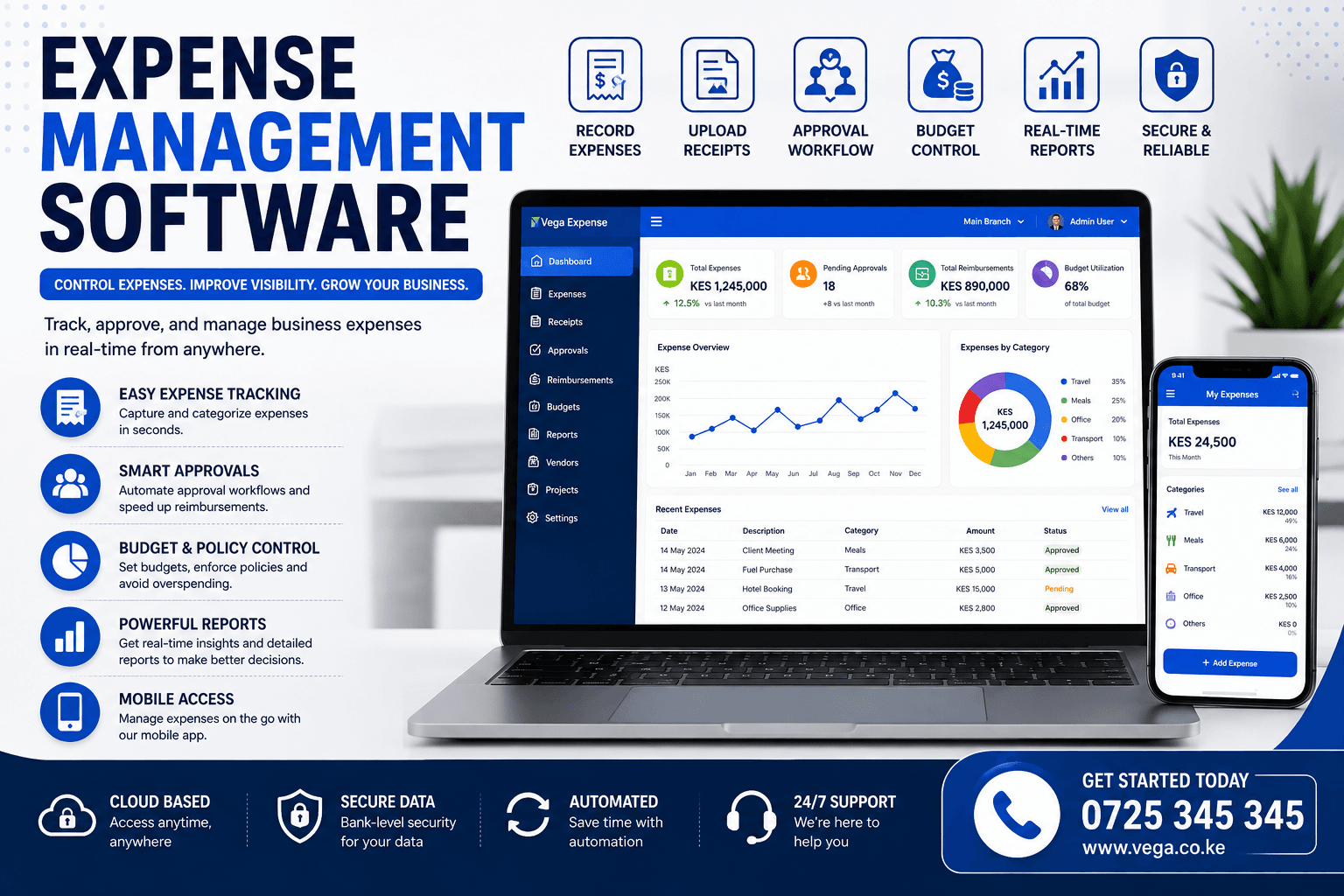
Managing business expenses manually can quickly become overwhelming. Receipts get lost, approvals take too long, reimbursements are delayed, and finance teams spend countless hours entering data into spreadsheets. These inefficiencies not only waste time but also increase the risk of errors, fraud, and unnecessary spending.
This is where Expense Management Software transforms business operations.
Whether you’re a startup, SME, or large enterprise, an expense management system automates expense tracking, approvals, reimbursements, reporting, and policy enforcement—all from one centralized platform. Instead of chasing receipts and manually reconciling transactions, your finance team gains real-time visibility into company spending while employees enjoy a faster, more transparent reimbursement process.
In this guide, we’ll explore what Expense Management Software is, its key features, benefits, industries that rely on it, and how to choose the best solution for your business.
What is Expense Management Software?
Expense Management Software is a digital solution that helps businesses record, monitor, approve, reimburse, and report company expenses. It replaces manual processes with automated workflows, giving organizations greater control over operational spending and financial accuracy.
Modern expense management software can manage:
- Employee expenses
- Travel expenses
- Office expenses
- Fuel expenses
- Utility bills
- Vendor payments
- Project expenses
- Department budgets
- Business reimbursements
Cloud-based platforms also provide real-time access from any location, making them ideal for businesses with remote teams or multiple branches.
Why Businesses Need Expense Management Software
Many businesses struggle with:
- Lost receipts
- Duplicate expense claims
- Slow approval processes
- Budget overruns
- Manual data entry
- Delayed reimbursements
- Limited visibility into spending
- Inaccurate financial reporting
Expense Management Software solves these challenges by automating the entire expense lifecycle—from submission to approval, reimbursement, and reporting.
Key Features of Expense Management Software
Expense Recording
Employees can submit expenses in seconds by entering details or uploading receipts directly from their smartphones or computers.
Supported expense categories include:
- Travel
- Accommodation
- Meals
- Fuel
- Office supplies
- Utilities
- Maintenance
- Marketing
- Entertainment
Receipt Management
Paper receipts are easy to lose. Modern software allows users to:
- Upload receipt images
- Store digital receipts
- Organize receipts by category
- Search historical receipts
- Attach receipts to expense claims
Digital receipt storage also simplifies audits and tax compliance.
Expense Approval Workflow
Managers can approve or reject expenses through configurable workflows.
Approval processes may include:
- Team leaders
- Department heads
- Finance officers
- Directors
- Multi-level approvals
Notifications ensure requests are reviewed promptly.
Reimbursement Management
Automated reimbursement tracking allows finance teams to:
- Approve claims
- Schedule payments
- Monitor reimbursement status
- Generate payment reports
- Reduce processing time
Employees can track the status of their claims in real time.
Budget Monitoring
Businesses can define budgets for:
- Departments
- Projects
- Teams
- Branches
- Cost centers
The system alerts managers when spending approaches or exceeds approved budgets.
Expense Categories
Organize spending using custom categories such as:
- Travel
- Fuel
- Equipment
- Repairs
- Utilities
- Rent
- Marketing
- Salaries
- Training
Categorization improves financial reporting and analysis.
Vendor Management
Maintain detailed supplier information, including:
- Contact details
- Payment history
- Outstanding balances
- Purchase records
- Invoice tracking
This helps strengthen supplier relationships and improve payment management.
Real-Time Reporting
Generate reports including:
- Daily expenses
- Monthly spending
- Department expenses
- Employee reimbursements
- Budget utilization
- Vendor payments
- Project costs
- Profitability analysis
Interactive dashboards provide finance teams with actionable insights.
Multi-Branch Expense Management
Businesses operating across multiple locations can monitor expenses from a centralized dashboard.
Compare:
- Branch spending
- Department costs
- Employee claims
- Budget performance
- Operating expenses
Mobile Expense Management
Employees can:
- Capture receipts
- Submit claims
- Track approvals
- View reimbursements
- Receive notifications
All from a mobile device.
Benefits of Expense Management Software
Reduce Administrative Work
Automation eliminates repetitive tasks such as manual data entry and paper filing, allowing finance teams to focus on strategic work.
Improve Financial Accuracy
Automated calculations reduce errors in:
- Expense totals
- Tax calculations
- Currency conversions
- Budget tracking
- Financial reporting
Faster Approvals
Digital workflows reduce approval times from days to minutes, improving employee satisfaction and operational efficiency.
Better Budget Control
Real-time monitoring helps managers identify overspending before it becomes a problem.
Enhanced Compliance
Businesses can enforce spending policies by:
- Setting approval limits
- Restricting expense categories
- Requiring receipts
- Tracking audit logs
Better Decision-Making
Detailed analytics help leaders identify spending trends, reduce unnecessary costs, and allocate budgets more effectively.
Industries That Benefit from Expense Management Software
Expense Management Software is suitable for almost every industry, including:
- Retail businesses
- Manufacturing companies
- Construction firms
- Transport and logistics
- Hotels and hospitality
- Restaurants
- Healthcare facilities
- Educational institutions
- Professional service firms
- NGOs and non-profit organizations
- Government agencies
- Technology companies
- Financial institutions
- Real estate companies
Essential Features to Look For
When choosing Expense Management Software, prioritize solutions that offer:
- Cloud access
- Mobile applications
- Receipt scanning
- Automated approvals
- Budget controls
- Multi-currency support
- Multi-branch management
- Role-based permissions
- Audit trails
- Financial reporting
- Accounting integrations
- Data backups
Cloud-Based Expense Management
Cloud solutions provide significant advantages:
- Access anywhere
- Automatic backups
- Secure data storage
- Automatic updates
- Easy scalability
- Lower IT costs
- Multi-device synchronization
Cloud technology ensures finance teams always have access to the latest information.
Security Features
Financial information must remain protected.
Look for software with:
- Two-factor authentication (2FA)
- Data encryption
- Role-based access
- Secure cloud hosting
- Audit logs
- Automatic backups
- Password policies
Strong security protects both business finances and sensitive employee information.
Integrations
Modern Expense Management Software integrates with:
- Accounting software
- ERP systems
- Payroll software
- Banking platforms
- CRM systems
- Purchase management software
- Invoice management software
- Business intelligence tools
Integrations eliminate duplicate work and improve operational efficiency.
Common Mistakes Businesses Make
Avoid software that:
- Requires manual reporting
- Lacks mobile access
- Has limited reporting
- Doesn’t support approvals
- Cannot scale
- Offers poor security
- Has no integrations
- Provides limited customer support
Frequently Asked Questions
What is Expense Management Software?
Expense Management Software is a system that helps businesses record, approve, reimburse, and report company expenses while improving financial control.
Can employees submit expenses using their phones?
Yes. Most modern solutions include mobile apps or responsive web interfaces that allow employees to upload receipts and submit expenses from anywhere.
Is Expense Management Software suitable for small businesses?
Absolutely. Small businesses benefit from improved expense tracking, better budgeting, and faster reimbursement processes without needing large finance teams.
Can it manage multiple branches?
Yes. Cloud-based platforms allow organizations to monitor expenses across multiple locations from a single dashboard.
Does it integrate with accounting software?
Most modern Expense Management Software integrates with popular accounting and ERP solutions, reducing manual data entry and improving financial accuracy.
Future Trends in Expense Management Software
The future of expense management includes:
- AI-powered expense categorization
- Automated receipt recognition
- Predictive budget forecasting
- Real-time fraud detection
- Digital corporate cards
- Contactless expense submissions
- Voice-assisted expense reporting
- Advanced financial analytics
- Machine learning insights
- Intelligent approval automation
Businesses adopting these innovations will gain better visibility into spending while reducing administrative costs.
Conclusion
Investing in Expense Management Software helps businesses gain complete control over spending, improve financial accuracy, streamline approvals, and eliminate time-consuming manual processes. Whether you manage a small business or a large enterprise, the right expense management solution enables better budgeting, faster reimbursements, stronger compliance, and data-driven decision-making.
As organizations continue to embrace digital transformation, cloud-based expense management systems will become essential tools for improving operational efficiency, controlling costs, and supporting sustainable business growth.
Expense Approval Workflow
A structured approval process is essential for controlling business spending. Instead of relying on emails or paper forms, modern Expense Management Software automates approvals based on company policies.
Typical approval workflows include:
- Employee submits an expense claim
- Immediate supervisor reviews the request
- Department manager approves the expense
- Finance verifies supporting documents
- Payment is processed
- Employee receives reimbursement confirmation
This automated process reduces delays while ensuring accountability and transparency.
Expense Policy Management
Every business has spending policies that employees must follow.
Expense Management Software allows organizations to configure rules such as:
- Maximum daily meal allowance
- Travel spending limits
- Department budgets
- Vehicle fuel limits
- Accommodation limits
- Entertainment expenses
- Approval thresholds
The system can automatically flag or reject claims that violate company policies, helping organizations maintain financial discipline.
Mileage and Travel Expense Management
For organizations with field staff, sales teams, or traveling employees, travel expenses can represent a significant portion of operating costs.
Expense Management Software simplifies travel management by allowing users to record:
- Mileage
- Airfare
- Hotel accommodation
- Taxi fares
- Fuel purchases
- Parking fees
- Toll charges
- Meals
- Business entertainment
Managers can review and approve travel claims quickly while maintaining complete expense records.
Department Budget Control
Department managers need visibility into their spending throughout the financial year.
Expense Management Software enables organizations to allocate budgets for:
- Human Resources
- Finance
- Marketing
- Sales
- Operations
- Information Technology
- Customer Support
- Procurement
Managers receive alerts whenever spending approaches predefined budget limits, allowing corrective action before overspending occurs.
Project Expense Tracking
Businesses managing multiple projects need accurate cost allocation.
Project expense tracking enables organizations to:
- Assign expenses to projects
- Monitor project budgets
- Compare actual versus planned costs
- Measure project profitability
- Generate client billing reports
- Track reimbursable expenses
This is particularly valuable for construction companies, consulting firms, software development agencies, engineering companies, and NGOs.
Multi-Currency Expense Management
Organizations operating internationally often incur expenses in different currencies.
Modern Expense Management Software supports:
- Automatic currency conversion
- Exchange rate updates
- Multi-currency reporting
- Foreign travel expenses
- International supplier payments
- Global financial reporting
This simplifies accounting for businesses with international operations.
Real-Time Expense Dashboard
Finance teams need immediate visibility into company spending.
A modern dashboard typically displays:
- Today’s expenses
- Weekly spending
- Monthly operating costs
- Budget utilization
- Pending approvals
- Reimbursements due
- Outstanding claims
- Department spending
- Project expenses
- Vendor payments
Interactive dashboards help decision-makers identify spending patterns before they become financial problems.
Employee Self-Service Portal
Employees can manage their own expense claims without depending on finance staff.
Through the self-service portal, employees can:
- Submit expenses
- Upload receipts
- View approval status
- Check reimbursement history
- Download reports
- Update payment information
This improves efficiency while reducing administrative workload.
Digital Receipt Capture
One of the most useful features of Expense Management Software is digital receipt management.
Employees simply:
- Take a photo of the receipt
- Upload it through the mobile app
- Attach it to an expense claim
- Submit it for approval
Digital records eliminate paper filing while making audits significantly easier.
Expense Analytics
Powerful analytics transform raw expense data into meaningful insights.
Businesses can analyze:
- Spending trends
- Department expenses
- Employee spending habits
- Vendor costs
- Monthly comparisons
- Annual growth
- Cost-saving opportunities
- Budget performance
Data-driven insights help organizations improve profitability and reduce unnecessary expenditure.
Integration with Accounting Systems
Expense Management Software works best when connected to accounting platforms.
Typical integrations include:
- General Ledger
- Accounts Payable
- Payroll
- Banking
- Tax reporting
- ERP systems
- Procurement software
- Business intelligence platforms
These integrations eliminate duplicate data entry and improve financial accuracy.
Expense Management Software for Small Businesses
Small businesses often assume expense management software is only for large corporations.
In reality, small businesses gain significant benefits, including:
- Better cash flow management
- Accurate expense records
- Faster reimbursements
- Improved budgeting
- Simplified tax preparation
- Reduced paperwork
- Professional financial reporting
Cloud-based solutions make these capabilities affordable for businesses of all sizes.
Expense Management Software for Enterprises
Large organizations require advanced capabilities such as:
- Multi-company management
- Multi-branch reporting
- Global expense policies
- Multi-level approvals
- Multi-currency transactions
- Advanced analytics
- ERP integration
- Enterprise-grade security
Enterprise solutions support thousands of users while maintaining consistent financial controls.
How Expense Management Software Reduces Fraud
Fraud can significantly impact business profitability.
Modern systems reduce fraud through:
- Duplicate expense detection
- Mandatory receipt uploads
- Audit trails
- Approval workflows
- Role-based permissions
- Policy enforcement
- Automated alerts
- Real-time monitoring
These controls improve transparency and strengthen corporate governance.
Why Choose Cloud-Based Expense Management Software?
Cloud solutions offer several advantages over traditional on-premise systems:
- Access from anywhere
- Automatic software updates
- Lower maintenance costs
- Secure cloud backups
- Easy scalability
- Faster deployment
- Real-time collaboration
- Remote approvals
Businesses with remote teams or multiple offices especially benefit from cloud-based expense management.
Best Practices for Implementing Expense Management Software
To maximize the value of your software:
- Define clear expense policies.
- Train employees on the submission process.
- Configure approval workflows.
- Integrate with accounting software.
- Monitor spending regularly.
- Review expense reports monthly.
- Audit expense claims periodically.
- Update spending limits as the business grows.
Following these best practices ensures smoother adoption and stronger financial control.
Final Thoughts
Managing business expenses should never rely on spreadsheets, paper receipts, or lengthy approval chains. Modern Expense Management Software provides organizations with a centralized platform to automate expense tracking, approvals, reimbursements, reporting, and compliance.
Whether you’re a growing startup, a medium-sized business, or a large enterprise, implementing a cloud-based expense management solution helps reduce costs, improve financial visibility, accelerate reimbursements, and strengthen governance.
As businesses continue embracing digital transformation in 2026 and beyond, investing in a scalable Expense Management Software platform is a strategic decision that enhances operational efficiency, supports smarter budgeting, and drives sustainable growth.